
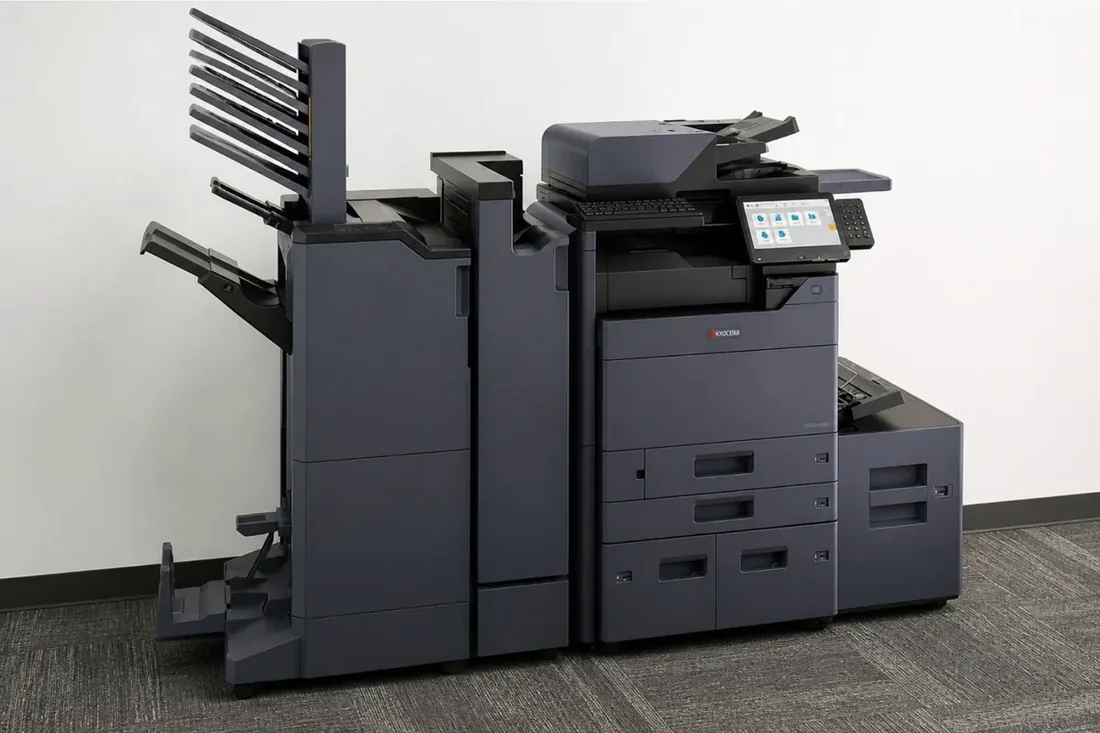
The Kyocera ECOSYS M8130cidn, Kyocera's 30 page a minute A3 colour copier, printer and scanner, sits in a great many South East Queensland offices. Our technicians have been inside these machines since they arrived in 2017. Find what yours is doing below, then call 1300 206 002 with the model and anything on the screen.
If you only remember one thing: write down the code exactly as it shows (C6000, C7102, J0501) before you switch the machine off. It tells the technician which part to bring.
Find the fault
C6000, or another C6 code, when it warms up
The C6000 group is the fuser, the part that melts toner onto the page. The M8130cidn heats a thin fuser belt by induction and watches its temperature at the centre, the middle and the edge. C6000 means it did not reach working heat in time. C6020, C6220 and C6320 mean a spot ran too hot, and C6030, C6130, C6230 and C6330 mean one of those temperature sensors has broken. C6600 means the belt stopped turning. A restart can clear it once; if the code comes back, leave it off and call us.
It stops with C7101, C7102, C7103 or C7104
Each colour has its own developer with a sensor that measures how much toner is in it. The last digit tells you which: 1 black, 2 cyan, 3 magenta, 4 yellow. Most of the time the developer has not seated properly or a connector has worked loose. If neither, that developer unit is replaced.
Colours are wrong, faint or patchy, or calibration fails with C7611 to C7614
The machine prints small test patches on its transfer belt and reads them with two sensors. When a patch reads wrong, you get washed out or blotchy colour, and during calibration a C761 code for the colour concerned. A dirty sensor is the easy fix; a tired drum or developer in that colour is the usual one.
Lines, streaks or a band down every page
Which way the line runs matters. Lines in the direction the paper travels point at a drum, a developer or dust on the laser windows; the M8130cidn has a small motor that wipes those windows, and C4600 means it has stopped. Bands across the page point at a roller. We print the machine's own test pages to see which colour is causing it before anything is taken apart.
Paper jams in tray 1, the bypass tray or the duplex
A jam code such as J0501, J0509 or J4002 says where the sheet stopped. Repeated jams at the same place usually mean worn feed rollers, which come in Kyocera's maintenance kit, or damp or curled paper. Our M8124cidn page lists the jam codes in full; they are the same on both models.
The document feeder takes two sheets, or none
The feeder on top has its own pick up roller and separation pad, good for about 300,000 originals. When they glaze over it starts double feeding or refusing a stack. It is a quick on site job.
The screen says to replace the maintenance kit
Kyocera sets the M8130cidn's two main kits at 200,000 images. One renews the black drum and developer, the fuser, the transfer belt and the feed rollers; the other renews the colour developers and drum. We fit them on site and reset the counters.
Scan to email or scan to a folder has stopped
Usually nothing is broken: an email password, a server setting or a shared folder has changed on the network. Our technician puts the address book and settings right on the machine while on site.
Kyocera M8130cidn error codes we get called about
The code on the screen, what the machine is telling you, and where our technician starts. Call 1300 206 002 and read us the code.
| Code | What it means | Where we start |
|---|---|---|
| C0840 | The clock has lost the date and time | Set the date and time again; if it keeps forgetting, the main board battery |
| C1010 | Tray 1 lift plate is not rising | Lift motor or a jammed cassette |
| C1020, C1030 | A lift motor in the add on paper feeder | The PF-470 or PF-471 feeder under the machine |
| C2101, C2102 | Developer motor stopped (black, or the colours) | Drive load, connector or motor |
| C2201, C2202 | Drum motor stopped (black, or the colours) | Drive unit, connector or motor |
| C2300, C2310 | Fuser motor not turning or not starting | Fuser drive, then the motor |
| C3100 | Scanner carriage did not find home | Carriage, its cable and the scanner motor |
| C3200 | Scanner lamp (LED) fault | The LED lamp and its connection |
| C4001 to C4014 | Laser unit polygon motor for black, cyan, magenta or yellow | Laser scanner unit |
| C4600 | The motor that cleans the laser windows has stopped | Its drive gears, then the motor |
| C6000 | Fuser did not heat up in time | Fuser seating, foreign matter on the heat belt, then the fuser |
| C6020, C6220, C6320 | Fuser too hot at the centre, edge or middle sensor | Fuser thermistors and the fuser |
| C6030, C6130, C6230, C6330 | A fuser heat sensor has failed | Usually a new fuser unit |
| C6600 | Fuser heat belt stopped turning | Fuser unit and its drawer connector |
| C7101 to C7104 | Toner density sensor in the K, C, M or Y developer | Developer seating, then that developer unit |
| C7611 to C7614 | Colour patch density wrong for K, C, M or Y | Clean the ID sensors, then drum and developer |
| C7800, C7810 | The room temperature sensor has failed | Sensor and its wiring |
| C8210 | Staple fault in the internal finisher | DF-470 staple unit |
| C9000 | The document feeder is not talking to the machine | Feeder connector and board |
Before you call
- The model, printed on the front: ECOSYS M8130cidn
- The code, exactly as it shows
- Whether it happens on copies, on prints from computers, or both
- The suburb, and whether someone will be there to let the technician in
With that, we can tell you on the phone whether it needs a visit and book the technician while you are on the line.
Kyocera M8130cidn questions
Is the M8130cidn the same machine as the M8124cidn?
Very nearly. The M8130cidn prints 30 A4 pages a minute and the M8124cidn 24, and the faster model scans with a CCD sensor and writes with two laser beams where the M8124cidn uses a contact image sensor and one beam. The fuser, drums, developers and nearly every service code are shared. Our Kyocera M8124cidn page covers its jam codes and the parts that wear.
Do you carry parts for the M8130cidn?
Yes. We keep the parts that wear on these machines, so most M8130cidn faults are fixed in the first visit.
Is there a call out fee?
No. Our service rate includes the call out, so you pay for the labour and any parts the machine needs.
Can I keep printing while a code is showing?
A paper jam you have cleared, yes. A fuser code (C6000 to C6990) or a motor code that comes back after a restart, no: switch it off and call us, because running it again only repeats the fault.
Which areas do you cover for Kyocera M8130cidn repairs?
Brisbane, Ipswich, Logan, the Redlands, Moreton Bay, the Gold Coast, the Sunshine Coast, Gympie and Toowoomba, on site at your office.
Book a technician or ask for a quote
Tell us what the printer or copier is doing and we will call you back. Or phone us now on 1300 206 002.